“Nature is disorder. I like to use nature to create order and show another side of it. I like to denature.” Kurokawa bends over the iMac, clicks through examples of his work on a hard drive, and digs out a new concert piece that uses NASA topographic data to generate a video rendering of the Earth’s surface. Peaks and troughs dance overa geometric chunk on the black screen, light years from the cabbie’s satnav. “The surface is abstract, but inside it’s governed by natural laws,” he says.
I find Kurokawa’s perspective on nature as disorder, and his desire to “denature” it very interesting, particularly how it resonates deeply with the tension between chaos and order that exists in both art and science. His use of natural data such as NASA’s topographic information to create structured, perhaps even arguably a surreal presentation of the Earth highlights the duality between the organic and the artificial. It suggests that while nature may appear unpredictable, it operates within a framework of fundamental laws that can be harnessed and reshaped through human interpretation.
Kurokawa ultimately challenges our perception of what is ‘natural’ and what is ‘artificial.’ His work demonstrates that the act of imposing order on nature does not necessarily strip it of its essence but rather reveals another dimension of its beauty—one that we might not perceive in its raw, untamed state.
Dissected, “de-natured,” and distilled into abstract sounds and images, natural phenomena become eccentric compositions, revealing the wonders contained within.
Ryoichi Kurokawa’s artistic approach reminds me of deconstruction—the process of breaking down natural forms, sounds, and movements into abstracted components before reassembling them into new configurations. His work does not aim to capture nature as it appears to the naked eye; rather, he dissects it, isolates its underlying structures, and reconstructs it through audiovisual synthesis. This act of deconstruction is not about destruction but rather about rediscovery, revealing hidden layers of complexity that are often overlooked in everyday perception.
In Octfalls, Kurokawa takes the movement of water—something familiar and continuous—and deconstructs it into disjointed yet synchronized audiovisual fragments. The cascading motion of waterfalls is translated into sharp, digital interruptions, reframing the fluidity of nature as something mechanical, algorithmic, and layered. In this process, he distills the essence of motion rather than merely illustrating it, allowing the audience to experience nature in a new, mediated form.
This act of reconstruction aligns with the Japanese aesthetic concept of wabi-sabi, which values imperfection and the beauty of decay. Kurokawa’s work does not seek to present a polished, idealized version of nature; instead, he embraces its instability and unpredictability. His compositions often feature glitches, distortions, and irregularities, mirroring the natural world’s inherent disorder. Through deconstruction, he does not strip nature of its essence but rather uncovers its transient, ever-evolving nature, which keeps the audience continuously engage in the nature system.
“Composers sculpt time. In fact, I like to think of my work as time design.” — Kurokawa
Whether it be simultaneously stimulating multiple sensory systems or mixing up rational with irrational realities and emotions, one of the biggest themes in Kurokawa’s compositions seem to be tying multiple elements and worlds that are seemingly different from each other all at once; and to me, it’s hard to imagine what kind of unexpected harmony his technique might bring. It seems that Kurokawa likes to take things that are already existing and are accessible to him (i.e. nature’s disorderly ways, hyper-rational realities) and give them a twist that acts as a “shocker” factor that brings forth curiosity and confusion from the recipient, which I thought was similar to other artists who do the same when they’re drawing inspiration for their works. However, I also came to realize that a lot of these other artists are all more focused on producing visual works, such as photographs, paintings, installations, etc., which made me wonder how it’s possible for sound engineers/composers to apply this “mixing reality with hyper-reality” into their works — I imagine that it might be more difficult for them because making this collision of two worlds seems to be much more prominent and thus easier to tell in visual artworks rather than audio.
I found his remark about how computer acted as a gateway for him to dive into graphic design/the “art world” fascinating, because this was one of the discussions we had in class a few weeks ago on whether the technology tools we have these days make it easier or harder for us to create art/music, etc. Because I was already inseparable from the more “traditional” art techniques such as painting and sculpting since youth before I transitioned into “tech-y” art, I thought creating works on technology was harder/more limiting to artists like me because learning about computers was always a scary realm. However, I can see how to many, it can be the exact reverse, especially if they didn’t have any background information or experience in creating artworks/music. Regardless of which circumstance you relate to more, I think this new relationship between technology and art opens up entirely new fields to both sides that allows us to expand our creativity and explore all kinds of possibilities in a much broader way.
Mosaic is an application designed by Emmanuel Mazza that combines Live Coding with Visual Programming in order to streamline the creative process without sacrificing artistic vision. Based on OpenFrameworks, an open source creative coding toolkit founded by Zachary Lieberman, Theo Watson and Arturo Castro, it utilizes a wide variety of programming languages including C++, GLSL, Python, Lua, and Bash. As seen in my patch above, it works by connecting blocks of sonic and visual data, facilitating an easy-to-follow data flow. Because Mosaic allows for more complex possibilities while remaining accessible, it is suitable for both beginners and advanced users who wish to create a wide range of real-time audio-visual compositions.
The diagram above outlines how Mosaic hybridizes Live Coding and Visual Programming paradigms in order to reinforce feedback and promote human-machine interaction. Its page, linked here, quotes Henri Bergson: “The eyes see only what the mind is prepared to comprehend.” For someone like me, whose comprehension of programming is limited, I am grateful for applications like Mosaic that allow me to create projects I can understand.
Having previously worked with MaxMSP, I found Mosaic’s interface buggy but still intuitive and to use. For my project, I wanted to create audio-reactive visuals that convey feelings of nostalgia and loss of memory. I found this old video of my father recording a song he had made for my brother and me. In Mosaic, I navigated to ‘Objects’ and then ‘Texture’ to find all the nodes that could manipulate and export video.
As seen above, I juggled various concepts and imported multiple videos to explore how Mosaic is able to warp and blend textures to serve whatever concept I landed on. I really liked how the video grabber blended my real-time position via the MacBook camera with the singing video of my father to convey how memories stay with us even as we change and grow. Because Mosaic can only play sound and video separately, I extracted the audio file from the video using VLC media player, and started focusing on how I wanted to manipulate the audio to convey a sense of loss.
As seen above, I used the compressor and bit cruncher objects to add distortion to the sound file so that I could lower or amplify the distortion real-time by lowering the thresh and moving the slider. The entire time, I was reflecting on how if I was using with a platform that only allowed for written code, like TidalCycles, I would have to manually write out these effects, but using Mosaic, I could drag and drop the objects that I wanted and simply connect them to achieve the control the audio the way I wanted to.
The most difficult part of my project was figuring out how to connect visual components with audio so that I could manipulate the blended video of myself and my father as I increased or decreased distortion. I really liked this audio analyzer object because, as seen by the yellow input and green output, it allowed me to do just that, and as an additional bonus, it manipulated the video by sound that were playing real-time, so I could speak into the Mac microphone and the video would distort even further. I really liked how this object strengthened the concept of my project, because I could speak about memory loss and the video would distort even further in response.
The audio analyzer object converted the sound data into numerical data that could then be converted back into visual data. And I blended visual distortion with the video of my father by controlling the sliders as seen above. I really loved how accessible the controls were, allowing me to manipulate the video and sound real-time according to the demands of the performance.
The finalized video and audio components of the project can be viewed here and here respectively. Through live manipulating the video and audio with my voice and the Mosaic controls as seen in the footage, I was able to convey concepts like memory loss and nostalgia for the purposes of this project. I really loved the potential for creativity via Visual Programming that Mosaic offers, and I will definitely continue to use this application for personal projects into the future.
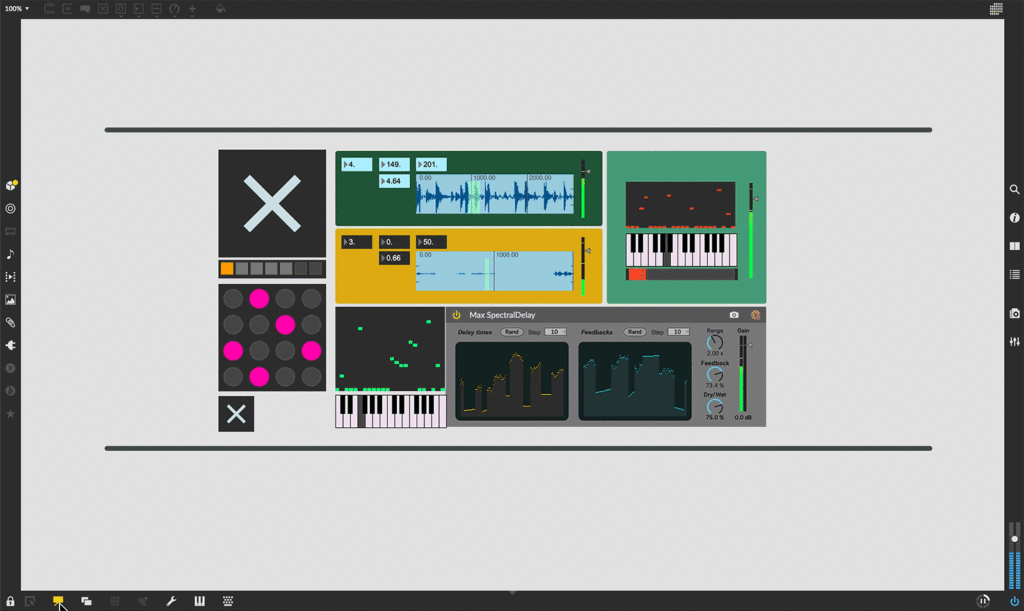
Max is a visual programing language for music and multimedia. It is used by composers, perfomers, software designers, researchers, and artists to create recordings, perfomances, and installations.
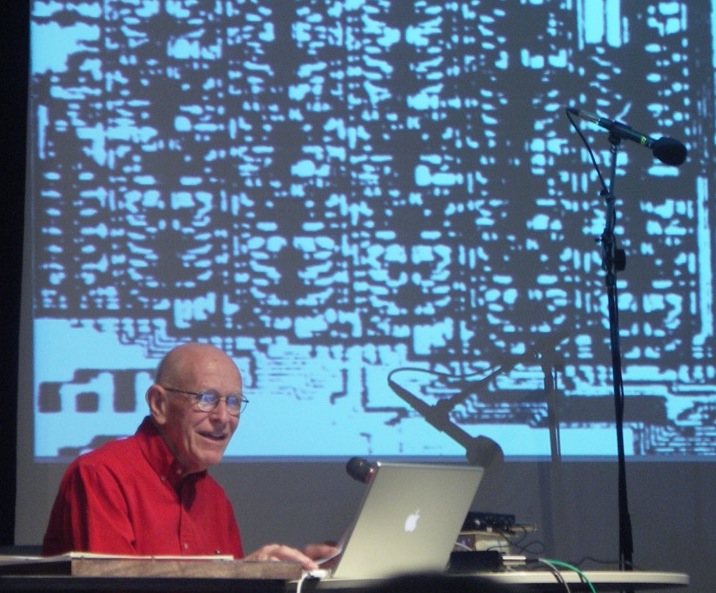
Max MSP’s origin can be traced back to the work of Max Mathews, who is often referred to as the father of computer music. In the 1960s, Mathews developed the Music-N series of programming languages. These early languages provided the foundation for digital sound synthesis and influenced many future music programming environments, including Max MSP. Mathews’ contributions laid the groundwork for interactive computer music by demonstrating that computers could generate and manipulate sound in real-time, an idea that continues to drive Max MSP’s development today.
Max Mathews
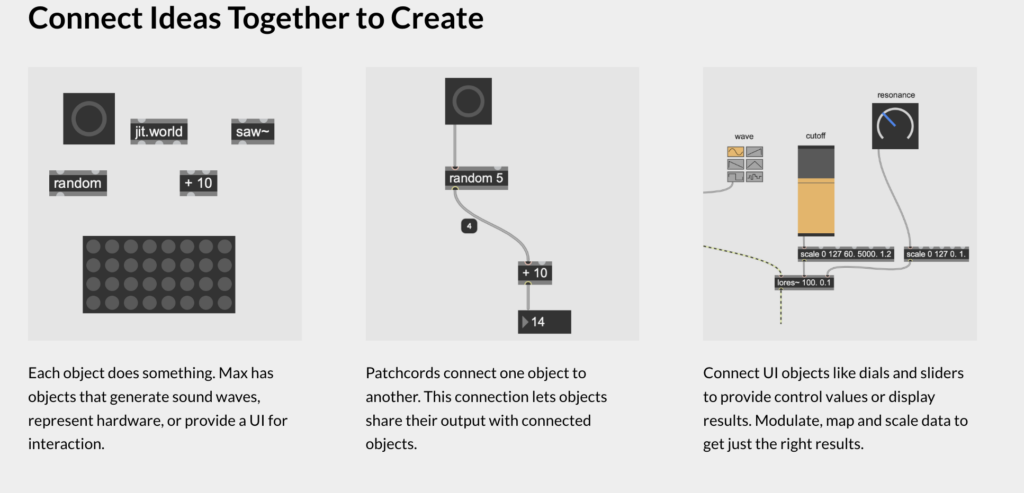
At its core, Max MSP operates through a visual patching system, where users connect objects that perform specific functions, such as generating sound, processing video, or managing data flow. Each object has inputs and outputs that allow users to design complex behaviors by linking them together in an intuitive graphical interface. This modular approach makes it accessible to both beginners and experienced programmers, as it eliminates the need for traditional text-based coding while still offering deep customization and extensibility. Additionally, Max supports JavaScript, Java, and C++ integration, enabling users to create custom objects and extend the software’s capabilities beyond its built-in tools. Another key strength of Max MSP is its seamless integration with hardware and external devices. It supports MIDI and OSC (Open Sound Control), making it compatible with a wide range of musical instruments, synthesizers, and external controllers. Additionally, it can interface with Arduino, Raspberry Pi, and other microcontrollers, allowing users to build interactive installations.
Max MSP is considered a live coding platform due to its real-time interaction capabilities. Unlike traditional programming languages, where code must be compiled before execution, Max allows users to modify patches on the go, adjusting parameters, adding new elements, and altering behavior without stopping the performance. This flexibility makes it particularly valuable in live music, audiovisual performances, and interactive installations.
Vuo is a visual programming environment designed for artists, designers, and creative developers to build interactive media applications without traditional coding. It is especially popular in fields like live visuals, generative art, motion graphics, and real-time interactive installations.
What makes Vuo unique is its node-based interface, which allows users to create complex visual and audio-driven projects through a modular drag-and-drop system. Unlike traditional coding environments, Vuo’s event-driven architecture enables seamless real-time interactivity, making it ideal for projects that require immediate feedback and dynamic responsiveness. It also supports Syphon, OSC, MIDI, and 3D graphics, making it a versatile tool for multimedia creators.
Vuo was developed by Kosada as an alternative to Apple’s now-discontinued Quartz Composer, which was widely used for real-time graphics. Launched in 2014, Vuo was designed to be a modern, GPU-accelerated, cross-platform tool that extends beyond Quartz Composer’s capabilities. Over time, it has grown to support 3D rendering, audio-reactive visuals, MIDI control, and OSC communication, making it a powerful tool for digital artists.
Today, Vuo is widely used for live performances, interactive installations, and experimental visual art, providing an intuitive and powerful platform for creative expression. It is also popular in VJing, projection mapping, and interactive museum exhibits, making it an essential tool in modern digital art.
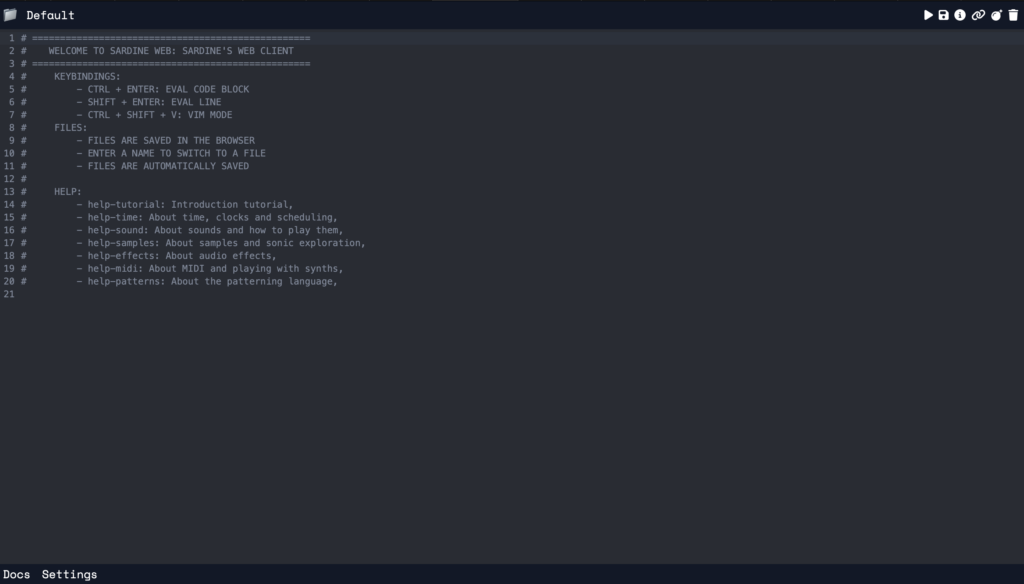
For my research project, I chose the live coding platform Sardine. I decided to go with Sardine because it stands out as a relatively new and exciting option built with Python. Sardine is a live coding environment and library for Python 3.10 and above. What sets Sardine apart is its focus on modularity and extensibility. Key components like clocks, parsers, and handlers are designed to be easily customized and extended. Think of it as a toolkit that allows you to build your own personalized live coding setup. It allows the customisation of IO logic, without the need to rewrite or refactor low-level system behaviour.
In its complete form, Sardine is designed to be a flexible toolkit for building custom live coding environments. The core components of Sardine are:
A Scheduling System: Based on asynchronous and recursive function calls.
A Modular Handler System: Allowing the addition/removal of various inputs/outputs (e.g., OSC, MIDI).
A Pattern Language: A general-purpose, number-based algorithmic pattern language.
For example, a simple pattern might look like this:
D('bd sn hh cp', i=i)
The FishBowl: A central environment for communication and synchronization between components.
However, configuring and using the full Sardine environment can be complex. This is where Sardine Web comes in. Sardine Web is a web-based text editor and interface built to provide a user-friendly entry point into the Sardine ecosystem. It simplifies the process of writing, running, and interacting with Sardine code.
The Creator: Raphaël Maurice Forment
Sardine was created by Raphaël Maurice Forment, a musician and live-coder from France, based in Lyon and Paris. Raphaël is not a traditional programmer but has developed his skills through self-study, embracing programming as a craft practice. He is currently pursuing his PhD at the Jean Monnet University of Saint-Etienne, focusing on live coding practices. His work involves building musical systems for improvisation, and he actively participates in concerts, workshops, and teaching live coding both in academic and informal settings.
Sardine began as a side project to demonstrate techniques for his PhD dissertation, reflecting his interest in exploring new ways to integrate programming with musical performance. Raphaël’s background in music and his passion for live coding have driven the development of Sardine, aiming to create a flexible tool that can be adapted to various artistic needs.
My Live Demo
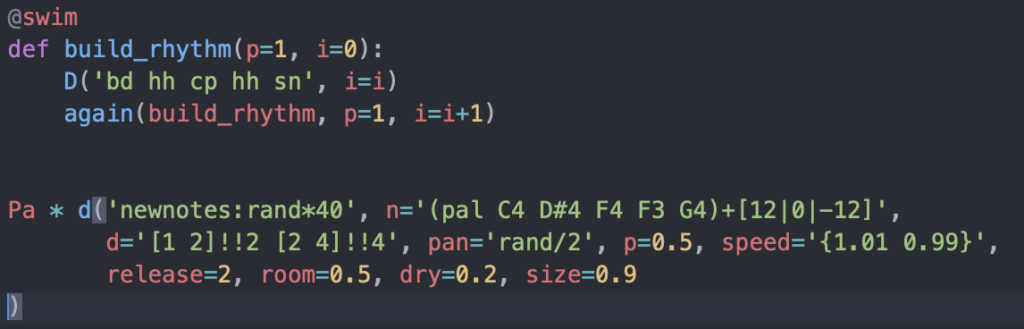
To demonstrate Sardine in action, I created a simple piece that highlights its scheduling and pattern language capabilities.
In this code snippet I used two different types of senders (d for Player and D for swim) where Player used for shorthand pattern creation, and @swim used for fundamental mechanism to create patterns.
Sardine in the Context of Live Coding
Sardine builds upon the ideas of existing Python-based live coding libraries like FoxDot and TidalVortex. However, it emphasizes flexibility and encourages users to create their own unique coding styles and interfaces. It tries to avoid enforcing specific ‘idiomatic patterns’ of usage, pushing users to experiment with different approaches to live performance and algorithmic music.
The creators of Sardine were also inspired by the Cookie Collective, a group known for complex multimedia performances using custom setups. This inspired the idea of a modular interface that could be customized and used for jam-ready synchronization. By allowing users to define their own workflows and interfaces, Sardine fosters a culture of experimentation and innovation within the live coding community.