For my research project, I chose to look into Alda which is described as “a music programming language for musicians.” It enables musicians to create compositions using text editors and the command line — super straightforward and simple if you’re already familiar with music notation! In terms of where Alda stands within the Live Coding context, I actually don’t think it’s much of a live coding platform. Although it has a “live-ish” mode, it is most powerful in its ability to simplify writing sheet music without being too focused on the act of notation, and this is what the creator Dave Yarwood intended as a musician and programmer. But who knows? Maybe the ability to simply notate and write notes for instruments in parallel allows for live band performances? or improvisation using more classical instruments and typical notation.
To understand how Alda works, I simply installed it and played around with its live or repl mode while following the cheat sheet. Afterward, I tried to find online tutorials or performances, and only found one which was sufficient for me to understand the potential of Alda! I then started breaking down some notation to try to put together a presentation that portrays this potential to my classmates.

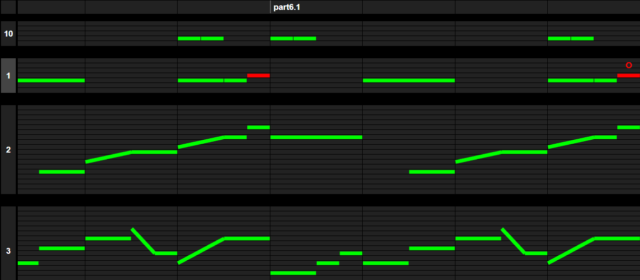
I personally really enjoyed working with Alda and reviving my music theory knowledge, although I’ve never properly composed a track I watched a youtube video and tried to give it a go. Here’s my (very basic) composition:

and here’s the code:

gMajScale = [g a b > c d e f+ g]
gMajChord = [o2 g1/b/>d] (vol 50) #First of the scale
cMajChord = [o3 c1/e/g ] (vol 50)#Fourth of the scale
dMajChord = [o3 d1/f+/a ] (vol 50) #Fifth of the Scale

piano:
V1:
gMajChord | cMajChord | gMajChord | dMajChord #LH: 1-4-1-5 , 1-4-1-1 chord progression.
gMajChord | cMajChord | gMajChord | gMajChord

V2:
g4 a b a | c e c d | g2 (quant 30) > g4 (quant 99) b | d1 #RH (melody): inserting random notes from the scale

g4 a b a | c e c d | g2 (quant 30) > g4 (quant 99) b | < g1

midi-acoustic-bass:
o2 g8 r r b8 r r r r | r e4 c8 r r r | g8 r r b8 r r r r | d8 r r f8 r r r (volume 100) #played around with notes from the scale and note lengths
o2 g8 r r b8 r r r r | r e4 c8 r r r | g8 r r b8 r r r r | g8 r r b8 r r r r (volume 100)

percussion:
[o2 c8 r r c c r r ]*8 #experimented until something worked(?)
o3 c+

Screen Recording 2022-09-19 at 10.05.52 Screen Recording 2022-09-19 at 09.54.29

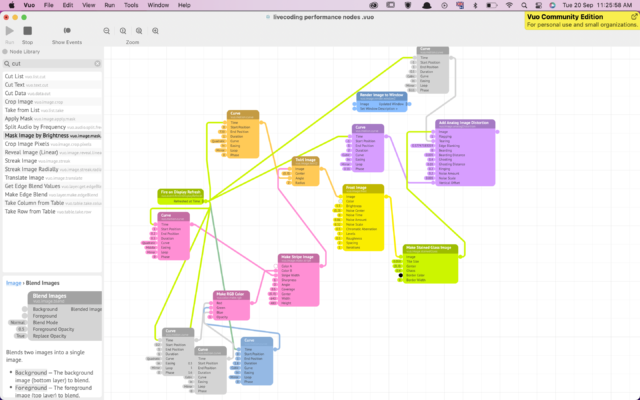
Praxis Live is a hybrid live visual programming platform that uses both Java and Processing to code visuals and audio. It is node-based so that users have easy access to important pieces of code, and it also has real-time processing.

To get started with using Praxis Live, I downloaded example projects. I experimented with ‘Funky Origami’, ‘Smoky 3D’, ‘Circles’ and ‘Mouse Drawing’. One good thing about this platform is that you can make changes to the project in real-time once you save. The node-based system also allows you to easily make changes without changing code. Though, you can edit the code for more detailed changes.

Praxis Live would be a very good choice for a live coding performance, due to the easily accessible code through the nodes, which also makes everything much easier for the audience to understand.


I found this reading particularly interesting because of the mathematical part of it (information theory) but at the same time a little difficult to follow because of the music technicality. What I really found eye-opening was the difference between random corruption versus random generation. For my second assignment, I was initially struggling a lot to create something that sounded nice or meaningful because I do not have any musical background and I do not know which notes to hit, what sounds to use together, etc. Because of this lack of music technicality, I was just trying to generate random patterns I could think of that sounded monotonous after a point. As the author writes, even my music was, “Informative, unpredictable, not conforming to something heard before, but it [fell] short of being a musical composition.”

This reading made me realize how we could create a better, more meaningful musical composition that conveys emotions of anticipation, prediction, surprise, disappointment, reassurance, or return through the usage of noise (random corruption of carefully selected notes/sounds). I now understand what Prof. Aaron meant when he said, “Put in some question marks here and there, use random range, degradeBy, sometimesBy, etc.” I earlier wondered how this could lead to music that would be more pleasurable to hear because it will be so off-pattern, out of sync, uncertain, and not have a clear rhythm but I now understand why this is important and a better move than random generation. This reading has enlightened me to a different approach to composing music. From really struggling to create live computational music, I believe I now have a direction I want to explore – replace defined information with random data at random times, degrading otherwise fully intelligible signals.

I do not know if this will make me a better composer or the next assignment a bit easier but the idea of using information theory in computational music is quite fascinating and I think I will definitely look more into it later 🙂

The reading states that random corruption could help prevent redundancy and repetition, resulting in less bored listeners. This inspires me to incorporate more noise during my live coding sessions, in the form of ? and rand functions, making the piece more unpredictable. The challenge, however, seems lie in navigating the right amount of randomness to use. During last class, when we were playing around with the ? function, I noticed that there was always a point where overusing the “?” function lead to the piece sounding more off and empty. Hitting the right amount of randomness seems to be optimize the sound, but anything below and beyond it seems to do the opposite.

This lead me to question, how much randomness is too much? Is there a point where adding more randomness decreases the musicality of the piece? How can I know when that point would be? Is it subjective or is there a formula for that too?

While reading this week’s article, I found myself asking — Why do we enjoy live coding?

“But the longer we listen, the more boring it becomes. Our sense of anticipation grows as we wait for something more, for change, uncertainty, the unpredictable, the resumption of information.”

Is it because of the entropy it creates? We can unconsciously seek experiences that are chaotic and unpredictable, and creating this in a predictable, coding environment can seem safe and exciting.

“Random corruption should not be confused with random generation.”

When differentiating between corruption and generation, I wonder if it’s this precise noise that is so appealing about live coding.

Are there people who don’t / can’t enjoy this random noise “corruption”? It seems that at times, performances can get intense on visuals and audio. Speaking from personal experience of creating a visually intense experience in another IM class, people with epilepsy were advised not to part-take in it during the showcase, because it could trigger a physical response. So is it the same with live coding? Can some of the improvisation elements get so out of control that they become triggering?

According to the writer, when things like randomness and noise come into play, music can sound more organic and engaging to the listener and can help trigger different emotions.
This made me think of instances where I would be listening to a song I’d never heard before. It happens, that for some songs, I would unconsciously predict the next couple words of the lyrics, or complete the upcoming part of the melody in my head.
Whenever this happens, I always leave feeling a bit bored, if not even a little disappointed. Therefore, I do believe that some form of unpredictability in music is what captivates us the most.
Although predictability in music can be comforting at times, it can also be a little irritating. You don’t want every song you listen to or make to just blend into the next. And, randomness as a compositional tool can set the piece apart.
I acknowledge that this might be regarding our expectations when we’re discovering a song or a musical piece for the first time, and it’s different if we are already familiar with a song and just enjoy coming back to it.


Spiegel believes that “random corruption should not be confused with random generation.” This, to me, highlights the idea that things should be done with intention and moderation.
For example, I have a friend who is a very talented singer, but during his earlier singing years, he used to always incorporate a little way too many runs into the song. I found this impressive, certainly, but not too enjoyable to listen to. When trying to add interesting elements to a piece, you don’t want to lose the original sound or message and overshadow it with randomness and change. The goal is to simply embellish what’s already there.
Therefore, I believe that not all random additions work, and not all random sounds that do work should be kept in.

“Our sense of anticipation grows as we wait for something more, for change, uncertainty, the unpredictable, the resumption of information”


This sentence in the article was the first thing that caught my attention. Spiegel claims that the same block of music becomes boring the more we listen to it. While I do agree with this and I have experienced it, especially while preparing for the in-class performance, I still have to wonder to what extent this applies. When I take into consideration the songs and music I listen to, I find myself playing the same playlist every time, despite knowing each song in there by heart. This made me wonder why is it that we get bored of some music faster than other ones? If what Spiegel said is true, then why do we keep coming back to the same songs over and over again despite knowing exactly how the progress? 


Spiegel mentions that by adding noise to the composition, we can make it more interesting because of the decrease in predictability. But as mentioned in class, we still need to have some sort of rhythm or base for the music to sound good. How do we know how much randomness or noise is too much? How do we find the balance between predictability and randomness to create a piece that will always be engaging? Is it even possible to create a piece that will never get boring?