I chose Sardine because I am more comfortable with Python, and I thought it would be interesting to use it for live coding. Since it is relatively new and especially because it is an open-source project, it caught my attention. I like open-source projects because, as a developer, they allow us to build communities and collaborate on ideas. I also wanted to be part of that community while trying it out.
Sardine was created by Raphaël Maurice Forment, a musician and self-taught programmer based in Lyon and Paris. It was developed in 2022 (or around I am not too sure) for his PhD dissertation in musicology at the University of Saint-Étienne.
So, what can we create with Sardine? You can create music, beats, and almost anything related to sound and musical performance. By default, Sardine utilizes the SuperDirt audio engine. Sardine sends OSC messages to SuperDirt to trigger samples and synths, allowing for audio manipulation.
And Sardine works with Python 3.10 or above versions.
How does it work?
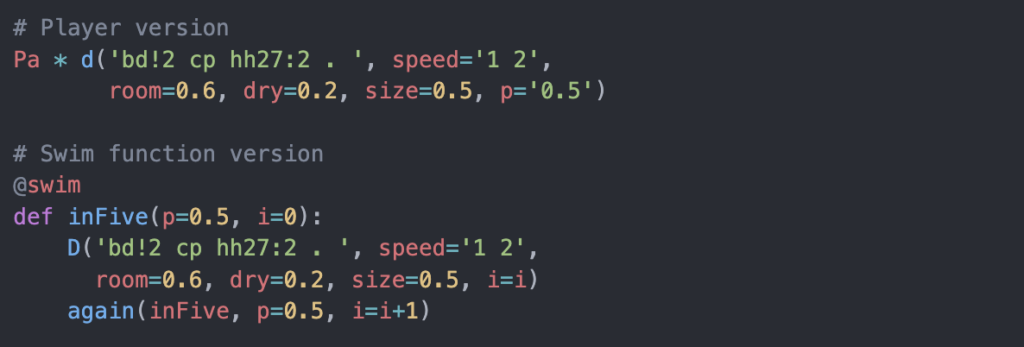
Sardine follows a Player and Sender structure.
Pais a player and it acts on a pattern.d()is the sender and provides the pattern.*is the operator that assigns the pattern to the player.
Syntax Example:

Isn’t the syntax simple? I found it rather straightforward to work with. Especially after working with SuperDirt, it looks similar and even easier to understand.
There are two ways to generate patterns with Sardine:
Playera shorthand syntax built on top of it@swimfunctions
Players can also generate complex patterns, but you quickly lose readability as things become more complicated.
The @swim decorator allows multiple senders, whereas Players can only play one pattern at a time.
My Experience with Sardine
What I enjoyed most about working with Sardine is how easy it is to set up and start creating. I did not need a separate text editor because I can directly interact with it from the terminal. There is also Sardine Web, where I can write and evaluate code easily.
Demo Video:
My Code:
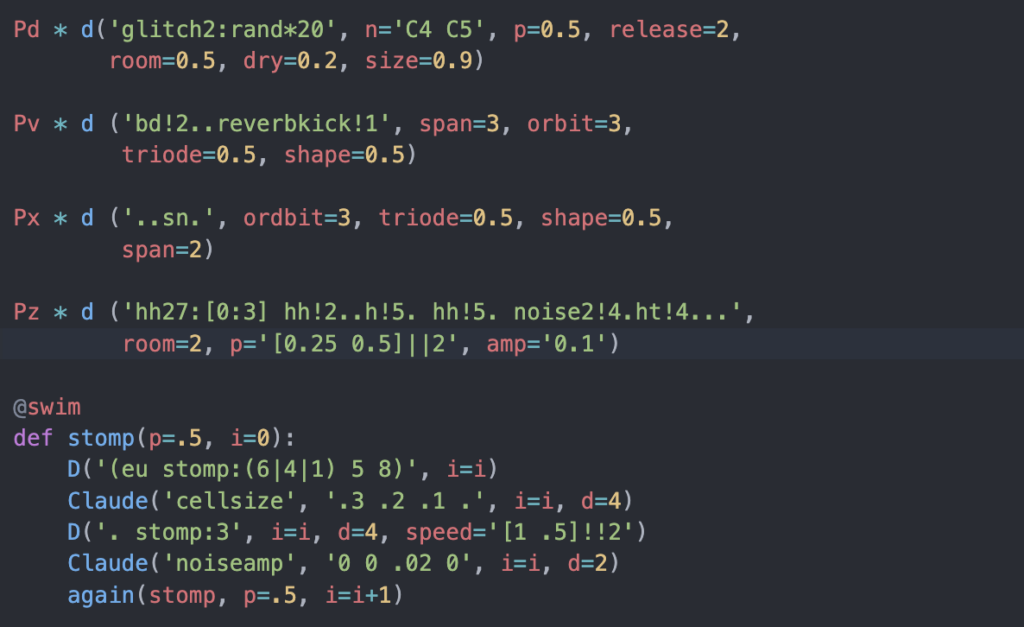
(The Claude visual is used from https://github.com/mugulmd/Claude/)
What I liked working with Sardine:
- Easy to set up and get started
- Very well-written documentation, even though there are not many tutorials online
- Easy to synchronize with visuals by installing Claude (Claude is another open-source tool for synchronizing visuals with audio in a live-coding context. It has a Sardine extension and allows you to control an OpenGL shader directly from Sardine.)
Downsides:
- Not many tutorials available online
Resources:
- Sardine GitHub Repository: https://github.com/Bubobubobubobubo/sardine
- Sardine Documentation: https://sardine.raphaelforment.fr/presentation.html
- Project Showcases with Sardine: https://sardine.raphaelforment.fr/showcase/claude.html