Solo coding #1:
Solo coding #2:
Team coding:
Solo coding #1:
Solo coding #2:
Team coding:
When I was working on my compositions with hydra and tidal, I found myself always leaning toward glitch sounds and the visual effects that matched them. Somehow, I found them to be clean and straightforward effects that everyone is familiar with. The reading was written in 2009-2010 by Rosa Menkman. I understand that at that time, people might have leaned toward “perfection” in technology by integrating sharper images, faster speeds, and invisible interfaces. However, since then, people have become more experimental with technology by playing around with glitches, noises, and colors. So, I believe that what she stated about bringing unfamiliarity and the unexpected through effects such as glitches is something we see very often today.
Menkman said that “The main subject of most glitch art is critical perception. Critical in this sense is twofold: either criticizing the way technology is conventionally perceived, or showing the medium in a critical state. Glitches release a critical potential that forces the viewer to actively reflect on the technology.” This made me realize that when I watch videos with glitches, they somehow make me concentrate more, as I start thinking about how and when the glitch is happening. I think this has a strong engagement effect on the audience. This solidifies that while watching glitch art, the audience perceives glitches without knowing how they came about, which gives them an opportunity to focus on their form to interpret their structures and learn more from what can actually be seen.
While reading, I also liked how the text was organized, with glitch effects added between sections and experiments with text indentation. This further reinforced what she is saying about breaking continuity and linearity. I also watched a video by the author where she experimented with glitch effects in many different ways. I realized that although I have used glitch effects before, I have never really explored them beyond simple techniques. This gave me new ideas on how I can use glitch effects in more creative ways.
Demo Video:
Composition structure: A + B + A + B(with slight modification)
I first started my composition in Tidal by gathering all the class examples and sample patterns that I liked. I experimented by changing the beats and playing around with different speeds. After settling on two parts, A and B, that I liked, I organized them into a composition with an A + B + A + B structure. Because I wanted a clear sense of beginning and ending, I kept both the opening and closing sections simple, with minimal beats and visuals, so the composition could build up and then gradually fade out.
For the visuals, I initially used a blob slowly flowing on the screen. When I synced it with my sound by adding a glitch effect to match the glitch sound, it felt too boring, and there were no significant differences between parts A and B. Therefore, I added a new section where more chaotic and unexpected visuals appear in part B.
Code Snippets:
shape(200, 0.4, 0.02)
  .repeat(() => cc[3] + 1, () => cc[3] + 1)
  .modulate(osc(6, 0.1, 1.5), 0.2)
  .modulateScale(osc(3,0.5),-0.6)
  .modulate(noise(() => cc[1], 0.2), 0.3)
  .color(
    () => Math.sin(time) * 0.5 + 0.5,
    0.4,
    1
  )
  .modulate(
    noise(50, 0.5),
    () => cc[0] + cc[0] * Math.sin(time*8)
  )
  .add(o0, () => cc[3])
  .scale(0.9)
  .out()
start = do
d1 $ slow 2 $ s "house(4,8)" # gain 0.9
d2 $ ccv "0 127" # ccn 1 # s "midi"
d3 $ s "chin" <| n (run 4) # gain 2
d4 $ s "click" <| n (run 4)
d5 $ s "bubble" <| n (run 8)
d12 $ ccv "0" # ccn 3 # s "midi"
start
back_drop_with_glitch = do
d6 $
s "supersnare(9,16)?"
# cps (range 0.45 0.5 $ fast 2 tri)
# sustain (range 0.05 0.25 $ slow 0.2 sine)
# djf (range 0.4 0.9 $ slow 32 tri)
# pan (range 0.2 0.8 $ slow 0.3 sine)
# gain (range 0.3 0.7 $ fast 9.2 sine)
# amp 0.9
d7 $
every 8 rev $
s "bd*8 sn*8"
# n "[1 ~ ~ ~ 1 ~ ~ ~] [[2 0?] ~ ~ [~ 0?]]"
# amp "0.02 0.02"
# shape "0.4 0.5"
d8 $
every 4 rev $
s "[sostoms? ~ ~ sostoms?]*2"
# sustain (range 0.02 0.1 $ slow 0.2 sine)
# freq 420
# shape (range 0.25 0.7 $ slow 0.43 sine)
# voice (range 0.25 0.5 $ slow 0.3 sine)
# delay 0.1
# delayt 0.4
# delayfb 0.5
# amp 0.2
d9 $
s "[~ superhat]*4"
# accelerate 1.5
# nudge 0.02
# amp 0.1
d10 $ s "glitch" <| n (run 8)
d11 $ ccv "0 0 0 0 0 0 0 10" # ccn 0 # s "midi"
back_drop_with_glitch
another_beat = do
-- d1 $ s "ul" # n (run 16)
d5 $ s "supersnare(9,16)?" # cps (range 0.5 0.45 $ fast 2 tri ) # sustain (range 0.05 0.25 $ slow 0.2 sine ) # djf (range 0.4 0.9 $ slow 32 tri ) # pan (range 0.2 0.8 $ slow 0.3 sine )
d7 $ fast 2 $ every 8 rev $ s "bd*8 sn*8" # n "[1 ~ ~ ~ 1 ~ ~ ~] [[2 0?] ~ ~ [~ 0?]]" # amp "0.02 0.02" # shape "0.4 0.5"
d7 $ fast 2 $ every 4 rev $ s "[sostoms? ~ ~ sostoms?]*2" # sustain (range 0.1 0.02 $ slow 0.2 sine ) # freq 420 # shape (range 00.7 0.25 $ slow 0.43 sine ) # voice (range 00.5 0.25 $ slow 0.3 sine ) # delay 0.1 # delayt 0.4 # delayfb 0.5
d8 $ s "[~ superhat]*4" # accelerate 1.5 # nudge 0.02
d9 $ sound "bd:13 [~ bd] sd:2 bd:13" # krush "4"
d12 $ slow 2 $ s "arpy" <| up "c'maj(3,8) f'maj(3,8) ef'maj(3,8,1) bf4'maj(3,8)"
d1 $ ccv "0 0 0 0 0 127" # ccn 3 # s "midi"
d4 $ fast 2 $ s "kurt" <| n (run 1)
another_beat
do
start
back_drop_with_glitch
beat_silence = do
start
d6 silence
d7 silence
d8 silence
d9 silence
d10 silence
beat_silence
hushHere is a demo video of my composition progress:
I really enjoyed reading about Kurokawa’s approach to his creative works. What he said about nature especially stood out to me. He explained that nature is disorder, and he likes to use it to create order and show another side of it. In simple terms, he likes to “de-nature” a subject to reveal the patterns and structures within it. This is a great way to think about generative art. From my own experience, I often start with noise or randomness and then use functions to shape it into something appealing or familiar. Reading this makes me realize that live coding shouldn’t just be about showing off a cool new visual, a sound, or a fast algorithm. It should be about evolution. If I want my compositions to stand out, they should feel like they are growing in front of the audience. Anything that feels natural stands out to us because we recognize those same patterns within ourselves. I also believe in maintaining a “sweet spot” of balance between abrupt changes and consistent patterns.
Kurokawa’s lack of bias and his openness to exploring new tools, whether they are legacy software or brand-new technology, is the exact spirit that allows for true artistic exploration. He avoids sticking to just one tool or software, which usually limits what we can create. By setting aside these biases, Kurokawa leads the way in bringing complex ideas to reality in their best possible form.
I chose Sardine because I am more comfortable with Python, and I thought it would be interesting to use it for live coding. Since it is relatively new and especially because it is an open-source project, it caught my attention. I like open-source projects because, as a developer, they allow us to build communities and collaborate on ideas. I also wanted to be part of that community while trying it out.
Sardine was created by Raphaël Maurice Forment, a musician and self-taught programmer based in Lyon and Paris. It was developed in 2022 (or around I am not too sure) for his PhD dissertation in musicology at the University of Saint-Étienne.
So, what can we create with Sardine? You can create music, beats, and almost anything related to sound and musical performance. By default, Sardine utilizes the SuperDirt audio engine. Sardine sends OSC messages to SuperDirt to trigger samples and synths, allowing for audio manipulation.
And Sardine works with Python 3.10 or above versions.
How does it work?
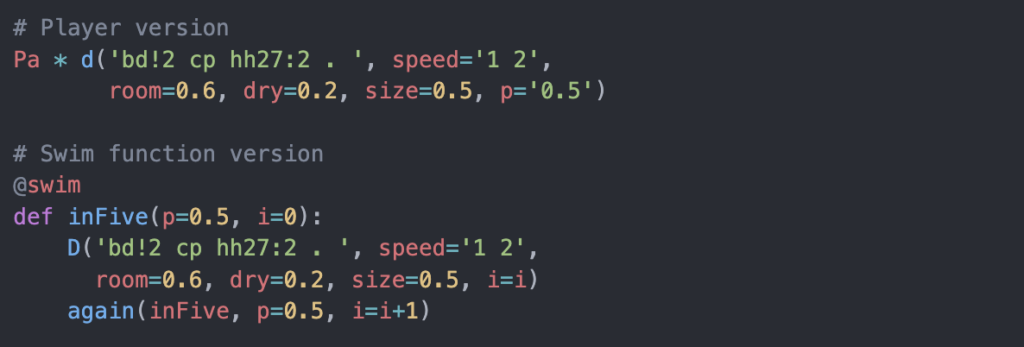
Sardine follows a Player and Sender structure.
Pa is a player and it acts on a pattern.d() is the sender and provides the pattern. * is the operator that assigns the pattern to the player.Syntax Example:

Isn’t the syntax simple? I found it rather straightforward to work with. Especially after working with SuperDirt, it looks similar and even easier to understand.
There are two ways to generate patterns with Sardine:
Player a shorthand syntax built on top of it@swim functions Players can also generate complex patterns, but you quickly lose readability as things become more complicated.
The @swim decorator allows multiple senders, whereas Players can only play one pattern at a time.
My Experience with Sardine
What I enjoyed most about working with Sardine is how easy it is to set up and start creating. I did not need a separate text editor because I can directly interact with it from the terminal. There is also Sardine Web, where I can write and evaluate code easily.
Demo Video:
My Code:
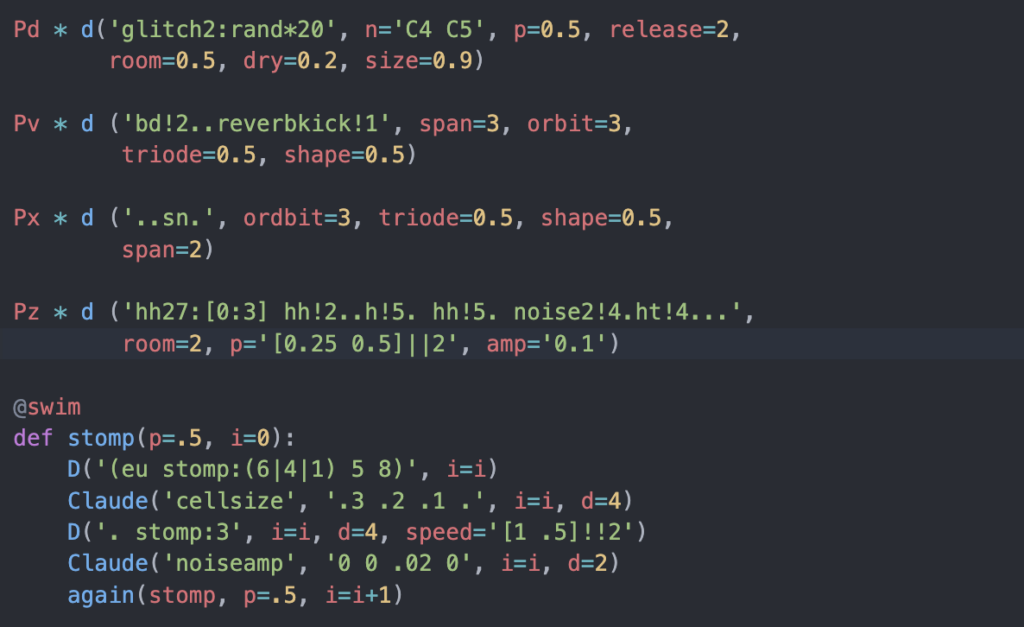
(The Claude visual is used from https://github.com/mugulmd/Claude/)
What I liked working with Sardine:
Downsides:
Resources:
While I’m neither a regular listener of Afrobeats nor a musician, the moment I hear it I want to move my body. For me, it’s not the melody, but it’s the steady, undeniable pulse that feels so alive. The reading provided an explanation for this on how Afro-diasporic music is built on multiple interlocking rhythmic patterns that make it inseparable from dance. Microtiming further explains how musicians place notes slightly early or late relative to the strict pulse, delivers the musicians feel to the listerners. This subtle human variance is what turns the static rhythm into a groove. Therefore one can conclude that the human presence itself makes the music feel alive.
This led me to a fascinating question as we shift in class to creating our own beats. We’re building beats not by striking a drum, but by coding. Once the pattern is programmed, it’s static unless we go back and edit it. So, can a beat made this way ever truly feel alive? Can we even create something as subtle and human as microtiming from a keyboard? The reading’s conclusion points toward an exciting answer. Artists aren’t just trying to perfectly imitate human timing with machines. Instead, they are forging a new continuum between body and technology. Expression no longer comes only from a musician’s hands on an instrument, but from the creative dialogue between human intention and digital process. I believe this is where my experience with live coding would fit in. Performing with my own programmed beats, I realize that making them feel alive doesn’t rely on sound alone. The interaction becomes key: by showing the lines of code that create the rhythm, the audience witnesses the architecture of the groove. This transparency can turn a static pattern into a dynamic, embodied experience.